
The GiroCockpit SDK allows a simple implementation of the GiroCheckout API. The SDK includes all API calls provided by GiroCheckout. For every API there is an example script in the examples section.
Requirements
- The SDK uses the cURL extension for server communication.
- All data must be given in UTF-8. The SDK does not take care of the conversion.
- PHP >= 5.2
Download
Download GiroCheckout PHP SDK 2.5.14
Github
GiroCheckout SDK is now also available and installable via composer, packagist and Github. The version numbers of both releases differ in the second number: The Github version has an even number (such as 2.6.1), the normal version an uneven one (2.5.1). Find our github repository here and our package on packagist.org here.
Important note regarding notify and redirect
GiroCheckout uses two parallel channels for the communication between the GiroCheckout server and the Shop: The notification (or notify for short) and the redirect. The notify is a server to server call in the background, whereas the redirect runs over the customer’s browser, showing him the transaction result at the end. Both paths must function separately and independently from each other, in case one of them doesn’t reach its destination. This way, the transaction is also successful if the notification happens to not arrive at the shop for whatever reason (so only the redirect could be successful) or if the customer interrupts the redirection to the shop site (so only the notify gets through). But of course a check is required on both sides whether the order has already been processed in the shop, in order to avoid a duplicate processing.
Please also see API Basics.
Folders
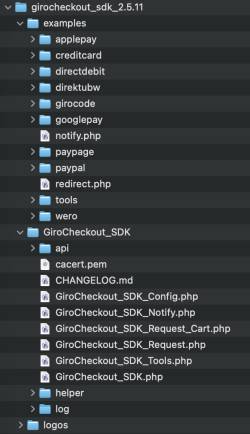
The folder “examples” includes any example script. Among them there is an example for every API call as well as a notification and a redirect script. The folder “GiroCheckout_SDK” contains the GiroCheckout_SDK.php, which needs to be included in order to use the SDK functionalities.
List of all request types (Request & Notify)
| API documentation | request type | object name |
|---|---|---|
| credit card | ||
| credit card payment | creditCardTransaction | GiroCheckout_SDK_CreditCardTransaction() |
| get PKN | creditCardGetPKN | GiroCheckout_SDK_CreditCardGetPKN() |
| recurring credit card payment | creditCardRecurringTransaction | GiroCheckout_SDK_CreditCardRecurringTransaction() |
| credit card void | creditCardVoid | GiroCheckout_SDK_CreditCardVoid() |
| direct debit | ||
| direct debit without payment page | directDebitTransaction | GiroCheckout_SDK_DirectDebitTransaction() |
| direct debit payment page | directDebitTransactionWithPaymentPage | GiroCheckout_SDK_DirectDebitTransactionWithPaymentPage() |
| direct debit void | directDebitVoid | GiroCheckout_SDK_DirectDebitVoid() |
| Payment Page Transaktion | ||
| Payment through Payment Page | paypageTransaction | GiroCheckout_SDK_PaypageTransaction() |
| Project request | paypageProjects | GiroCheckout_SDK_PaypageProjects() |
| PayPal | ||
| PayPal transaction | paypalTransaction | GiroCheckout_SDK_PaypalTransaction() |
| Direktüberweisung | ||
| Direktüberweisung payment | GiroCheckout_SDK_TransactionType_helper::TRANS_TYPE_DIREKTUBW_TRANSACTION: “direktubwTransaction” | GiroCheckout_SDK_DirektubwTransaction() |
| Apple Pay | ||
| Apple Pay payment | GiroCheckout_SDK_TransactionType_helper::TRANS_TYPE_APPLE_PAY_FORM_TRANSACTION: “applePayFormTransaction” | GiroCheckout_SDK_ApplePayFormTransaction() |
| Apple Pay capture | GiroCheckout_SDK_TransactionType_helper::TRANS_TYPE_APPLE_PAY_CAPTURE: “applePayCapture” | GiroCheckout_SDK_ApplePayCapture() |
| Apple Pay refund | GiroCheckout_SDK_TransactionType_helper::TRANS_TYPE_APPLE_PAY_REFUND: “applePayRefund” | GiroCheckout_SDK_ApplePayRefund() |
| Apple Pay void | GiroCheckout_SDK_TransactionType_helper::TRANS_TYPE_APPLE_PAY_VOID: “applePayVoid” | GiroCheckout_SDK_ApplePayVoid() |
| Google Pay | ||
| Google Pay payment | GiroCheckout_SDK_TransactionType_helper::TRANS_TYPE_GOOGLE_PAY_FORM_TRANSACTION: “googlePayFormTransaction” | GiroCheckout_SDK_GooglePayFormTransaction() |
| Google Pay capture | GiroCheckout_SDK_TransactionType_helper::TRANS_TYPE_GOOGLE_PAY_CAPTURE: “googlePayCapture” | GiroCheckout_SDK_GooglePayCapture() |
| Google Pay refund | GiroCheckout_SDK_TransactionType_helper::TRANS_TYPE_GOOGLE_PAY_REFUND: “googlePayRefund” | GiroCheckout_SDK_GooglePayRefund() |
| Google Pay void | GiroCheckout_SDK_TransactionType_helper::TRANS_TYPE_GOOGLE_PAY_VOID: “googlePayVoid” | GiroCheckout_SDK_GooglePayVoid() |
| Wero | ||
| Wero payment | GiroCheckout_SDK_TransactionType_helper::TRANS_TYPE_WERO_TRANSACTION: “weroTransaction” | GiroCheckout_SDK_WeroTransaction() |
| Wero refund | GiroCheckout_SDK_TransactionType_helper::TRANS_TYPE_WERO_REFUND: “weroRefund” | GiroCheckout_SDK_WeroRefund() |
| tools | ||
| get transaction information | getTransactionTool | GiroCheckout_SDK_Tools_GetTransaction() |
Implementation of an API call
This implementation example is based on the “examples/wero/weroTransction.php” file.
Load SDK
require_once '../../GiroCheckout_SDK/GiroCheckout_SDK.php';The file “GiroCheckout_SDK.php” has to be included in an appropriate place, to use API functionalities.
Configure data for authentication
$merchantID = xxx;
$projectID = xxx;
$projectPassword = xxx;
This data is provided in the GiroCheckout Portal. Ensure that the used project ID is correct and belongs to an API call. For example you can only use a Wero project ID for a “weroTransaction” request.
API call
$request = new GiroCheckout_SDK_Request(GiroCheckout_SDK_TransactionType_helper::TRANS_TYPE_WERO_TRANSACTION ));
$request->setSecret($projectPassword);
$request->addParam('merchantId',$merchantID)
        ->addParam('projectId',$projectID)
        ->addParam('merchantTxId',1234567890)
        ->addParam('amount',100)
        ->addParam('currency','EUR')
        ->addParam('purpose','Beispieltransaktion')
        ->addParam('urlRedirect','https://www.my-domain.de/girocheckout/redirect-wero')
        ->addParam('urlNotify','https://www.my-domain.de/girocheckout/notify-wero')
        //the hash field is auto generated by the SDK
        ->submit();
To perform a request, there has to be an instantiated and configured request object (list of all request types). The project password has to be passed to the request object by calling the setSecret() method. It is used for the hash generation. All API parameters, except for the hash parameter, have to be set in the request object by calling addParam().
The method submit() performs the API call to GiroCheckout.
Process API response
if($request->requestHasSucceeded()) {
  $rc = $request->getResponseParam('rc');
  $msg = $request->getResponseParam('msg');
  $ref = $request->getResponseParam('reference');
  $redir = $request->getResponseParam('redirect');
  $request->redirectCustomerToPaymentProvider();
}
/* if the transaction did not succeed, update your local system, get the responsecode and notify the customer */
else {
  $rc = $request->getResponseParam('rc');
  $msg = $request->getResponseParam('msg');
  $request->getResponseMessage($rc,'DE');
}
The method requestHasSucceeded() returns true if the request was successfully performed. Any API response parameters are provided by the getResponseParam() method. The customer redirection can be executed by calling the redirectCustomerToPaymentProvider() method. The buyer will then be redirected to the URL given in the redirect parameter.
If an eror occured, you can find the corresponding error code in the rc parameter. The method getResponseMessage() delivers a translated error message in a supported language.
Notification und Redirect scripts
This implementation example is based on the “examples/notification.php” file.
Load SDK
require_once '../GiroCheckout_SDK/GiroCheckout_SDK.php';The file “GiroCheckout_SDK.php” has to be included in an appropriate place, to use API functionalities.
Configure data for authentication
$projectPassword = xxx;The password is provided in the GiroCheckout Portal. It is for the hash comparison, to ensure that GiroCheckout sends you Data.
Process notification
$notify = new GiroCheckout_SDK_Notify(GiroCheckout_SDK_TransactionType_helper::TRANS_TYPE_WERO_TRANSACTION ));
$notify->setSecret($projectPassword);
$notify->parseNotification($_GET);
The notification object will work the same way as the Request object. At first, it has to be instantiated with the transaction type (list of all request types) and configured with the password.
Afterwards, an array containing the request parameters has to be passed to the parseNotification() method.
Handle notification
if($notify->paymentSuccessful()) {
  $ref = $notify->getResponseParam('gcReference');
  $txid = $notify->getResponseParam('gcMerchantTxId');
  $bkid = $notify->getResponseParam('gcBackendTxId');
  $amt = $notify->getResponseParam('gcAmount');
  $cur = $notify->getResponseParam('gcCurrency');
  $rc = $notify->getResponseParam('gcResultPayment');

  $notify->sendOkStatus();
  exit;
}
else {
  $ref = $notify->getResponseParam('gcReference');
  $txid = $notify->getResponseParam('gcMerchantTxId');
  $bkid = $notify->getResponseParam('gcBackendTxId');
  $rc = $notify->getResponseParam('gcResultPayment');

  $notify->sendOkStatus();
  exit;
}
The method paymentSuccessful() returns true if the payment has succeeded. Any response parameter can be extracted via the getResponseParam() method.
sendOkStatus(), sendBadRequestStatus() and sendOtherStatus() respond with the appropriate header.
| HTTP status code | Method | Description |
|---|---|---|
| 200 (OK) | sendOkStatus() | The notification was processed correctly. |
| 400 (Bad Request) | sendBadRequestStatus() | The merchant did not process the notification and does not wish to be notified again. |
| All others | sendOtherStatus() | The notification is repeated no more than 10 times every 30 minutes until the merchant returns the status code 200 or 400. |
Changing the Server Endpoint
In special cases it may be necessary to access a different Server for development and tests than the default https://payment.girosolution.de. Should you have received another endpoint URL from Girosolution, there is a way of overriding the default server.
You may do this in one of three ways:
1) In your PHP code:
Via the environment:
apache_setenv( "GIROCHECKOUT_SERVER", "https://anderer.endpoint.de" );Or directly through the setServer() method:
try {
  $request = new GiroCheckout_SDK_Request(GiroCheckout_SDK_TransactionType_helper::TRANS_TYPE_WERO_TRANSACTION);
  $request->setSecret($projectPassword);
  $request->setServer( 2 ); // Set server to 2=dev, 1 is prod

  $request->addParam('merchantId',$merchantID)
          ->addParam(...)
          ->submit();
}
catch(Exception $e) {
  // Handle exception
}
2) On the Linux command line (e.g. for executing the SDK examples without a browser):
export GIROCHECKOUT_SERVER=https://other.endpoint.de3) In the Apache configuration (within the VirtualHost section):
SetEnv GIROCHECKOUT_SERVER "https://other.endpoint.de"Version 2.5.12/2.6.12 of the SDK added the ability to select via constan against which host environment the API should send its calls. This is done by setting one of the following values through above mentioned methods 1-3:
| Value | Description |
|---|---|
| gc1-dev | GiroCheckout 1 development environment |
| gc1-prod | GiroCheckout 1 production |
| gc2-preprod | GiroCheckout 2 pre-production (available soon) |
| gc2-prod | GiroCheckout 2 production (available soon) |
Note that you need credentials for the environments you are going to use.
Please note that in gc1 the URLs containg the string “v2” for historic reasons. Don’t confuse with gc2.
Operation via a proxy server
It is possible to operate the server communication via a proxy, if your environment requires to do so. To implement this, include the following code and modify the parameters accordingly, before the GiroCheckout_SDK_Request::submit() function is called:
  $Config = GiroCheckout_SDK_Config::getInstance();
  $Config->setConfig('CURLOPT_PROXY', 'http://myproxy.com'):
  $Config->setConfig('CURLOPT_PROXYPORT', 9090);
  $Config->setConfig('CURLOPT_PROXYUSERPWD', 'myuser:mypasswd');
Debugging
The SDK contains the opportunity to debug an API call. Therefor there has to be defined a constant which has to be set to “true”:
define('__GIROCHECKOUT_SDK_DEBUG__',true);Now the SDK will write a log file which is located under “GiroCheckout_PHP_SDK/log” by default. The webserver needs to have writing permissions to this folder. The debug mode should only be used during debug issues and should be deactivated afterwards.
Reading log file
The log file is segmented into different sections:
| Section | Description | Common issues |
|---|---|---|
| start | includes the timestamp when the script was loaded | |
| PHP ini | provides information about PHP, cURL and SSL | cURL or SSL is not activated |
| transaction | shows the used API call | |
| params set | shows any parameters that were given to the request object | parameters are missing |
| cURL request | includes any parameters that are sent to GiroCheckout | |
| cURL reply | cURL information about the server reply | |
| reply params | any parameters in the server’s reply | |
| notify input | information about the notify call (parameters, timestamp) | |
| reply params | information about the used reply method | |
| exception | includes the error description |
Set certificate file
Under an Windows server environment it might happen that cURL is not able to check the SSL certrificate. Then it will be necessary to give cURL an specific certificate file. The SDK provides the possibility of setting a local certificate file. Therefor the following code is needed bevore the $request→submit() method is called:
$request->setSslCertFile('path/to/certificate');For testing purposes the certificate validation can be disabled. Please do not use this in your live environment.
$request->setSslVerifyDisabled();Changelog
Version 2.5.14 / 2.6.14 (GIT) – 25.09.2026
- Make sure the Content-Type for the calls is application/x-www-form-urlencoded
Version 2.5.13 / 2.6.13 (GIT) – 24.07.2026
- Added version and SDK type headers for statistics and support
Version 2.5.12 / 2.6.12 (GIT) – 07.07.2026
- Added presets for development environment
Version 2.5.11 / 2.6.11 (GIT) – 13.05.2026
- Payment methods bluecode, eps, iDEAL, Maestro and Klarna removed
Version 2.5.10 / 2.6.10 (GIT) – 29.04.2026
- Correction Kassenzeichen field in refund of creditcard, direct debit, Apple Pay, Google Pay, Klarna and Wero.
Version 2.5.9 / 2.6.9 (GIT) – 06.02.2026
- Added support for WERO refund.